Key Takeaways
- Patch 7.4 "Into the Mist" launched December 16, 2025 and delivered the biggest UI overhaul Final Fantasy XIV had seen in years.
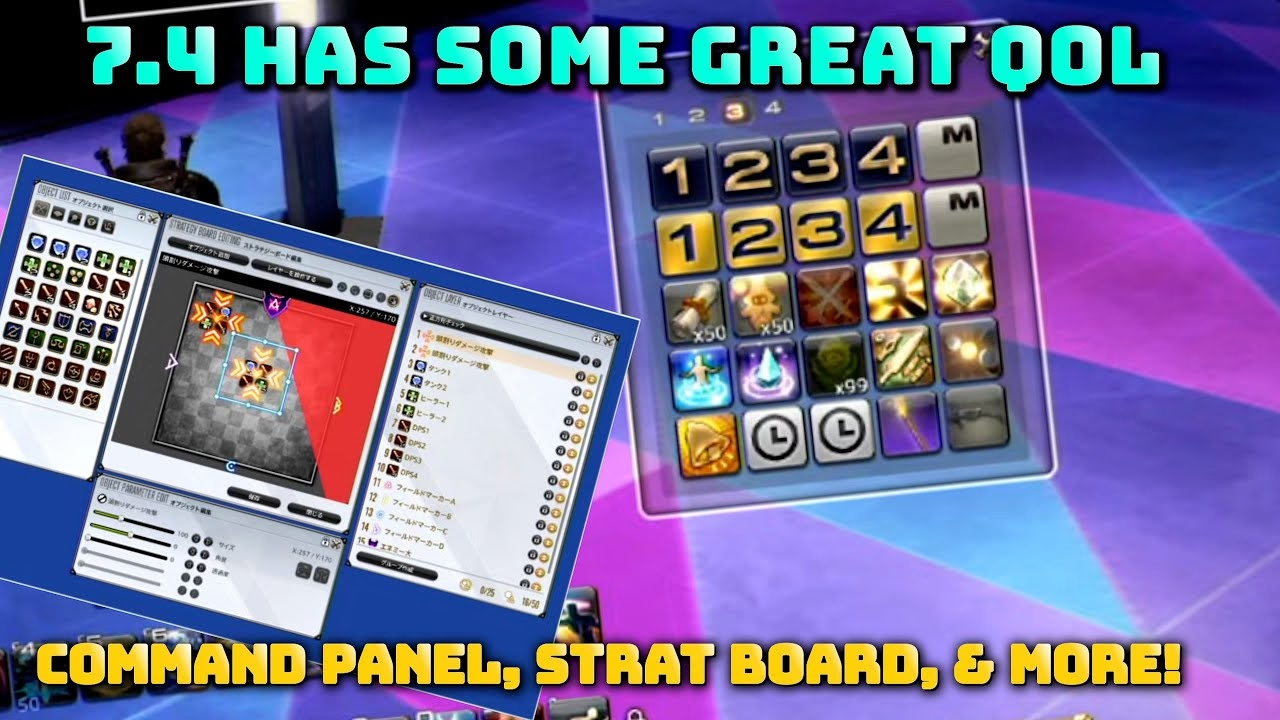
- The Command Panel adds four panels of 25 customisable slots (100 total), letting players move macros, emotes, and gear sets off main hotbars without complex macro chains.
- Two new UI colour themes — Clear Green and Clear White — join Clear Blue, Classic FF, and Light and Dark; switching requires a full game restart.
- The glamour system now allows role-free and level-free glamouring across all gear types, with weapon categories as the only remaining exception.
- The Strategy Board provides native in-game raid annotation and plan-sharing, removing the need for third-party diagram tools before pulls.
Here is what each of those changes actually means in practice.
New UI Features in FFXIV Patch 7.4
Patch 7.4, titled “Into the Mist,” launched on December 16, 2025, and delivered several significant quality-of-life improvements to Final Fantasy XIV. The most notable addition was the Command Panel — a new interface feature designed to declutter screens and streamline gameplay across all playstyles.
Command Panel: Cleaner Hotbars for Everyone
The Command Panel overhauled how players organise their interface. Four separate panels — each offering 25 customisable slots — removed the need for complex macro chains or tightly packed hotbars. The slots accept anything normally placed on a hotbar:
- Macros
- Emotes
- Actions
- Class changes and gear sets
Both PC and console players benefited immediately. The update removed the need for extensive configuration just to clean up a crowded screen, which had been a long-standing quality-of-life request from the raiding and role-playing communities alike.
Player Feedback on Slot Count
While the 100 total slots satisfied most players at launch, some raiders flagged the need for more space. The development team explained that expanding further risked making the panel itself cluttered, trading one problem for another. The 100-slot cap prioritises space for essential actions while keeping the interface readable on both widescreen monitors and PS5 displays.
Strategy Board: Raid Planning Without Third-Party Tools
The Strategy Board gave free-company leaders and static teams a native annotation tool. Players can sketch mechanics, mark positions, and share plans inside the game itself, reducing reliance on Discord screenshots and external diagram sites before pulls.
New UI Colour Themes
Patch 7.4 shipped two new UI colour themes — Clear Green and Clear White — alongside the existing Clear Blue, Classic FF, and Light and Dark options. Switching between themes requires navigating to System Configuration and restarting the client.
| Theme | Description |
|---|---|
| Clear Blue | Simple and clean design |
| Classic FF | Nostalgic feel with dark tones |
| Light and Dark | Basic functional aesthetics |
| Clear Green | Fresh and vivid appearance |
| Clear White | Elegant and crisp interface |
Players who switch themes frequently noted that the restart requirement remained the one friction point unresolved after 7.4.
Glamour System Overhaul
One of the most celebrated changes in 7.4 was the removal of role and level restrictions from the glamour system. Before this patch, a caster couldn't glamour into scouting gear regardless of aesthetics. From 7.4 onwards, players can mix any gear across roles for appearance purposes — the sole exception being weapon categories, which retain class restrictions. Players chasing specific looks for current content can browse FFXIV glamour services to reach the gear requirements faster.
Command Panel in Practice
Raiders and role-players both found immediate uses beyond the hotbar-cleanup pitch. For raiders, the Command Panel became a dedicated slot for markers, waymarks, and focus-target macros that previously cluttered main bars. For role-players, it offered a clean home for emote sets and costume-change macros without exposing them mid-combat.
- Positional markers and waymark macros moved off primary hotbars.
- Teleportation shortcuts across the aetheryte network.
- Non-urgent commands that don't belong on bars during combat.
The flexibility improved the interface for every playstyle with no compromise to combat-readiness.
Frequently Asked Questions
What is the Command Panel in FFXIV Patch 7.4?
The Command Panel is a UI feature introduced in Patch 7.4 that provides four separate panels, each with 25 customisable slots (100 total). Players can place macros, emotes, actions, and gear-set changes in these slots, freeing main hotbars for combat skills.
How many slots does the Command Panel have?
The Command Panel provides 100 total slots — four panels of 25 slots each. The development team capped expansion there to avoid recreating the clutter problem on the panel itself.
What new UI colour themes were added in Patch 7.4?
Patch 7.4 added Clear Green and Clear White, bringing the full roster to five options alongside Clear Blue, Classic FF, and Light and Dark. Applying a new theme requires a full client restart inside System Configuration.
How did the glamour system change in Patch 7.4?
From Patch 7.4, players can apply any gear piece to a glamour plate regardless of the original item's role or level requirement. Weapons remain restricted to the equipped job. A caster can now glamour into scouting armour; a tank into healer robes.
What is the Strategy Board in FFXIV?
The Strategy Board is a native in-game planning tool for raid teams. Players annotate tactics, mark positions, and share strategies with party members without leaving the game. It launched with Patch 7.4, "Into the Mist."
When did FFXIV Patch 7.4 release?
Patch 7.4, titled "Into the Mist," launched on December 16, 2025. The current live patch as of mid-2026 is Patch 7.5, "Trail to the Heavens."
Does the Command Panel work for console players?
Yes. The Command Panel is available on all platforms. PlayStation 5 players benefit especially, as the controller layout gains 100 additional slots without requiring extra cross-hotbar configurations.