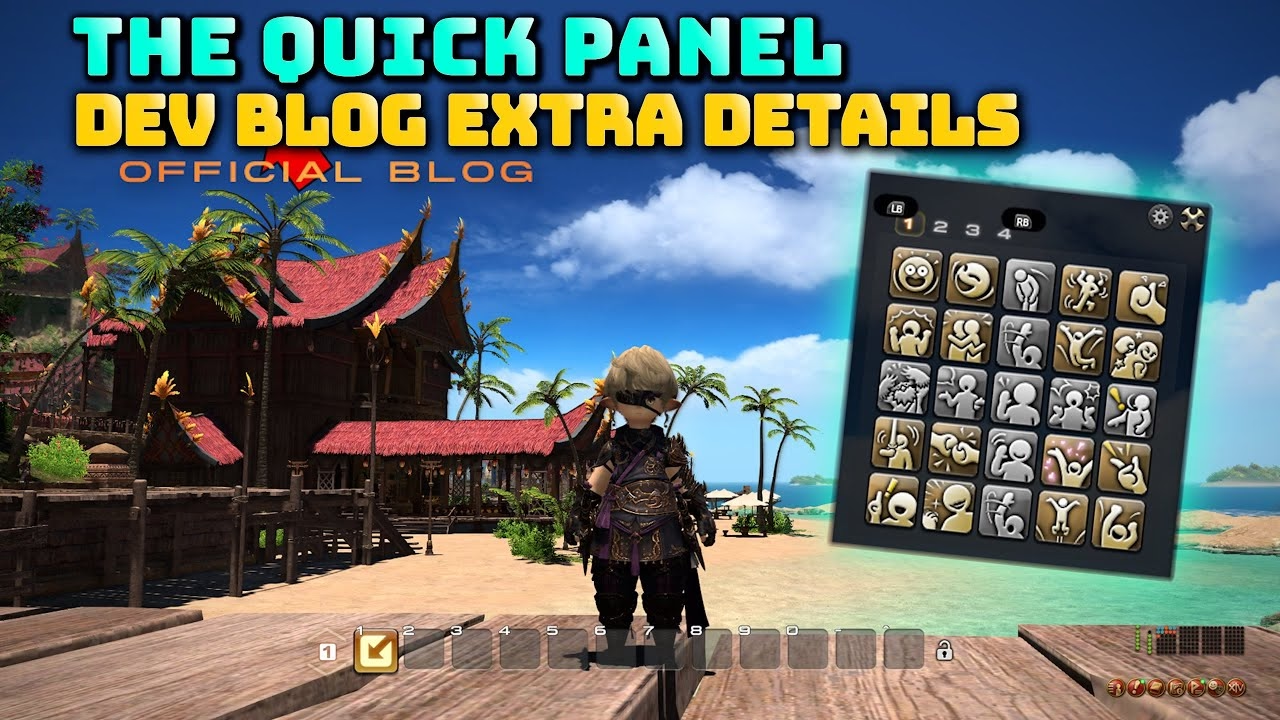
Introducing the New Quick Panel Feature
The latest announcement from the 90th Letter from the Producer Live introduces an exciting feature arriving in Final Fantasy XIV with patch 7.4 on December 16th: the Quick Panel. This innovative addition is designed to streamline the user interface by providing players with a new way to organize functions like emotes, buff foods, and markers without cluttering their primary UI. Unlike previous methods requiring macro knowledge, this built-in solution is accessible directly from the extra menu, allowing players to toggle between various actions efficiently.
Key Takeaways
- The Quick Panel arrives in FFXIV patch 7.4 as a built-in, macro-free way to store up to 100 actions across four labelled tabs.
- Any hotbar-compatible item — emotes, buff foods, mount whistles, rarely used abilities — can be placed in the panel without touching your main bars.
- Controller players benefit most: Y / Triangle skips slots for fast navigation, and the panel doubles as a lightweight extra cross hotbar.
- Transparency, position, and auto-open behaviour are all configurable from a cog-menu, so the panel adapts to any UI layout.
- The Lock Dragging option prevents accidental reordering once your tabs are set up.
With those fundamentals clear, here is a full breakdown of what the Quick Panel offers.
Key Features of the Quick Panel
- Easy Access and Setup: The Quick Panel can be quickly accessed and configured, accommodating any item that could typically be placed on a hotbar. It's an especially convenient option for controller users, minimizing screen clutter and enhancing UI space management.
- User-Friendly Design: The panel features four transparent tabs with 25 slots each, totaling 100 slots available for user customization. This provides ample room for organizing various in-game functionalities.
- Adjustable Transparency and Positioning: Users can choose between a transparent or solid black background, with toggles to adjust the transparency level. Additionally, the panel can be set to open based on mouse position, reducing unnecessary mouse movement.
- Gamepad Optimization: The Quick Panel supports smoother navigation for gamepad users. With the Y or Triangle button, players can skip slots to quickly access specific tray items, thus enhancing gamepad control efficiency.
Those four features cover the core setup. The benefits look different depending on how you play.
Benefits for Different Play Styles
- For Combat: Quick access to rarely used actions without occupying key hotbar slots meant for vital combat abilities.
- For Role-Players: Instantly access emotes and other role-playing elements without disrupting combat layouts.
- For General Usage: Save keystrokes and clicks for actions like teleportation, significantly decluttering the interface.
Beyond what each play style gains, a few practical habits make the Quick Panel significantly easier to manage day-to-day.
Usage Tips
- Tab Organization: Arrange items by category or frequency of use across the four tabs for ease of access.
- Shortcut Integration: Utilize macros or hotbar assignments to open the Quick Panel directly where needed.
This new feature aims to enhance the overall gameplay experience by providing flexibility and efficiency in UI management. The implementation of such a concept reflects Square Enix's commitment to continually improving the game based on user feedback. The anticipation surrounding future expansions of this tool looks promising, with the potential to support more advanced functionalities in response to player needs.
Despite being a new operation to get accustomed to, the Quick Panel presents several enticing features for FFXIV players. Users are encouraged to start small, utilizing only the most crucial slots initially and gradually expanding as needed. The concept of an additional cross hotbar will likely appeal to controller users, particularly if the latency is minimal, making it suitable for combat abilities.
Some useful features include:
- Window Latency: The reduction of latency aligns it closely with existing action buttons, enhancing its utility in combat scenarios.
- Last Panel Recall: A function that reopens the last-used panel, eliminating the hassle of navigating through multiple pages.
- Lock Dragging: Prevents accidental rearrangement of actions, maintaining a clean and efficient workspace.
Beyond ease of use, these functions reflect broader improvements and quality-of-life enhancements. The potential to streamline UI management could see the Quick Panel become a tool that many quickly integrate into their daily gameplay, reminiscent of other subtle yet impactful updates made in past expansions. ---
Those three functions — reduced latency, last-panel recall, and lock dragging — show the Quick Panel is designed for daily use, not just occasional access. Here is how that translates to different player types.
Anticipated Benefits and Considerations
- Controller Optimization: With controller users potentially deriving the most benefit, the interface offers an extra layer of organization for those managing various abilities and commands.
- Keyboard and Mouse Users: Although macros remain a popular choice for decluttering, the Quick Panel adds another avenue for tidy UI management without excessive reliance on macros.
Here's a simplified comparison of these features and their anticipated benefits:
| Feature | Benefit |
|---|---|
| Reduced Latency | Effective use in combat, akin to action buttons |
| Last Panel Recall | Improved efficiency and ease of navigation |
| Lock Dragging | Maintained organization, preventing accidental moves |
These small yet impactful changes signal an exciting time for players old and new. As the game evolves, integrating such unique functionalities provides not only a refreshed experience but also a glimpse into the developer’s attentiveness to community input. With the upcoming patch, many anticipate these enhancements to seamlessly blend into the daily rhythms of Eorzea life, becoming a natural part of the gameplay fabric.
Frequently Asked Questions
What is the Quick Panel in FFXIV?
The Quick Panel is a new UI feature arriving in patch 7.4 that lets players organize emotes, buff foods, mounts, and other infrequently used actions into up to 100 slots across four tabs — all without touching a hotbar.
How many slots does the FFXIV Quick Panel have?
The Quick Panel offers four tabs with 25 slots each, totalling 100 customisable slots per character.
Does the Quick Panel work with a controller?
Yes. Controller users can press Y or Triangle to skip slots and reach specific items faster. Square Enix designed the panel with gamepad navigation as a primary use case.
Can I use the Quick Panel for combat abilities?
The feature supports any item that can normally be placed on a hotbar, including some combat actions. However, the latency on panel-activated abilities may differ from standard hotbar buttons, so high-priority combat skills are best kept on a regular bar.
What is the "Last Panel Recall" function?
Last Panel Recall automatically reopens the tab you used most recently. This removes the need to scroll through pages each time you open the panel.
How is the Quick Panel different from a Cross Hotbar?
The Cross Hotbar is tied to controller input and affects active combat rotations. The Quick Panel is an overflow storage separate from the HUD — think of it as a tidy secondary drawer for anything you don't need on your main bars.
When does patch 7.4 with the Quick Panel release?
FFXIV patch 7.4, titled Into the Mist, was scheduled to release on December 16. The Quick Panel is among its headline quality-of-life additions.