Installing Addons for the Correct WoW Forever Client
Install a release that explicitly supports Forever into the active Forever client’s Interface/AddOns folder. A familiar addon name, a Retail download, or a Classic label is not enough to establish compatibility. Start with one addon and its required dependencies, then check it in game before adding more.
This guide distinguishes author-listed support from gameplay testing. The project releases named here list Forever support as of October 18, 2026; we have not run them inside the beta. That distinction matters because a file can load successfully and still fail when a particular interface or combat action is used.
Key Takeaways
- Use the correct game installation, not whichever WoW folder you find first.
- Choose a file explicitly labeled for Forever and inspect its release date and dependencies.
- Manual extraction must put the addon’s actual files one folder below AddOns.
- Baganator and Auctionator currently publish files tagged for Forever.
- Test ordinary gameplay and the feature you installed the addon to provide.
- Keep a working baseline so you can isolate errors after client or addon updates.
Begin with a utility whose purpose you can verify immediately, then expand the setup after it works.
A Small, Source-Checked Starting List
| Need | Project and current evidence | Important limitation |
|---|---|---|
| Bag organization | Baganator by plusmouse: release 837, October 13, lists Forever support | Requires Syndicator. An addon manager may install it automatically; verify it when installing manually. |
| Auction browsing and price information | Auctionator by plusmouse: release 341, October 13, lists Forever support | Auction information still needs current observations. A displayed price does not prove that an item will sell. |
These are candidate utilities with publisher-listed support, rather than a benchmarked “best addons” ranking. The project file pages are more useful than an old downloadable pack because they expose version labels and dependency information. Check them again after any client update.
For a full-interface replacement, the ForeverUI author’s introduction describes a project built specifically for Forever. Treat that as the author’s compatibility claim and review its current release instructions before replacing your whole setup. A large overhaul changes more variables than a bag addon.
Install Through an Addon Manager
- In Battle.net, select the Forever version you actually play and identify its installation location through the game’s installation options.
- In your addon manager, select or add that exact installation. If it cannot identify Forever correctly, use the manual route.
- Choose a release marked for Forever, not merely a release with a recent date.
- Review dependencies and install only the addon you want to test first.
- Restart the client, enable the addon if needed, and check the feature in a safe area.
The manager’s selected game matters more than its appearance. If it shows your usual Retail or Classic character setup, confirm the installation again before updating anything. A manager can report a successful installation into a client you are not currently launching.
Install Manually Without Nested Folders
Close the game before changing files. Open the active Forever installation and find its Interface/AddOns directory. The product folder’s exact name can vary with installation and test setup, so this guide does not ask you to create an assumed folder name.
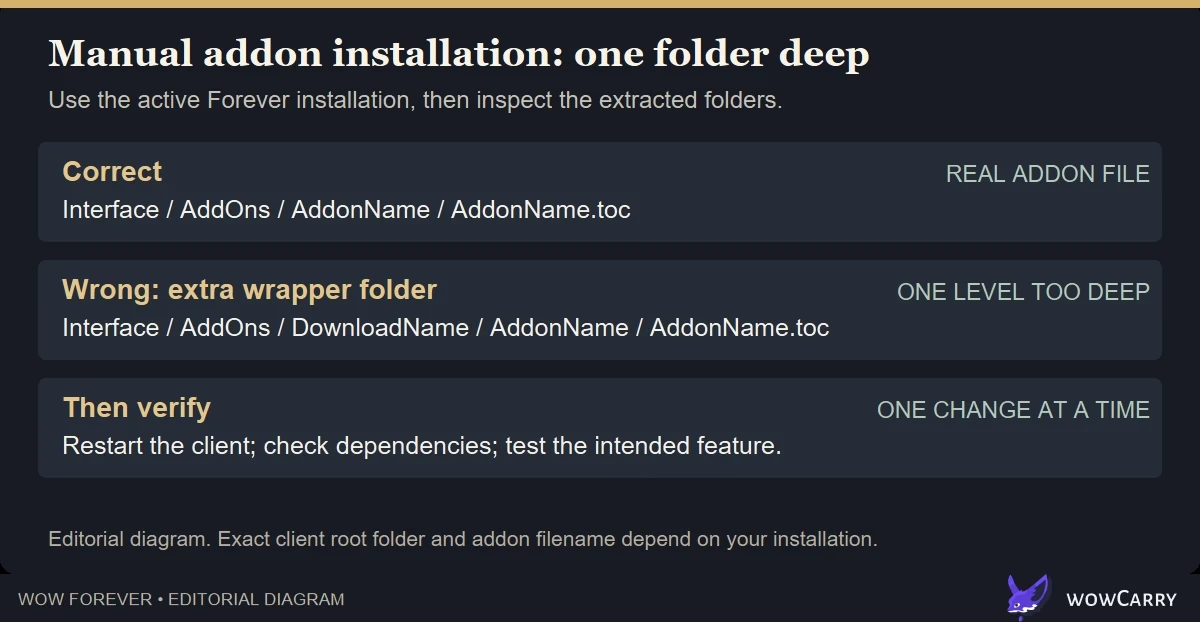
The useful path pattern is [active Forever client]/Interface/AddOns/[AddonName]/. Inside the addon folder, you should find its table-of-contents file, usually ending in .toc, and the supporting files. Extract required libraries or companion addons as their own folders when the author instructs you to do so.
A common broken layout is AddOns/DownloadName/AddonName/AddonName.toc. The additional wrapper directory keeps the actual addon one level too deep. Move the real addon folder into AddOns, preserving the internal file structure rather than scattering individual files.
Restart the game after installing a new folder. Reloading the interface is useful for many settings changes, but a full restart avoids ambiguity when the client has not discovered a newly added addon.
Check Compatibility in Five Minutes
- Log in with only the new addon and required dependencies enabled.
- Open its main feature: bags for a bag addon, or the auction interface for an auction addon.
- Change one harmless setting, close the panel, and open it again.
- For a combat-related addon, try a safe ordinary encounter and check whether it behaves during combat as well as outside it.
- Log out normally, then confirm the settings survive another login.
Record the client build, addon version, and exact action that fails. This is much more useful to an author than “doesn’t work.” Do not assume a combat-data addon supports every feature just because its settings panel opens; Forever’s current API behavior and the author’s implementation determine what is available.
Troubleshooting Decision Tree
The addon is missing from the list
First check the installation path. Then check for a nested download folder, a missing .toc file, or extraction into another WoW version. Restart the client after correcting the folder.
It appears, but a dependency is missing
Read the project’s dependencies and install their Forever-compatible versions. For Baganator, verify Syndicator. Avoid downloading random similarly named packages from search results.
It is labeled out of date
Find the current author release first. An out-of-date label can reflect an interface-version mismatch, while enabling old addons only attempts to load them; it does not repair removed APIs or establish compatibility.
It loads, then errors during play
Disable other addons and reproduce the same action. If the issue persists alone, record the build and error for the author. If it disappears, re-enable the remaining addons in small groups to identify the interaction.
The entire interface is unstable
Return to a baseline with addons disabled. Back up settings before any reset. Follow Blizzard’s interface reset instructions only when simpler isolation has not resolved the issue.
A launch setup should let you play comfortably before it tries to replace everything. Confirm that essential keybinds, party frames, and action bars work without relying on an untested package. Choose your class and role first so your UI priorities reflect the character you will actually play.
FAQ
Do Retail addons automatically work in WoW Forever?
No. Shared technology or similar features do not guarantee a working release. Check for explicit Forever support and test the feature you need.
Where do Forever addons go?
Under Interface/AddOns within the active Forever client. Identify that client through the launcher rather than guessing which existing WoW folder it uses.
Which addons have published Forever support?
At review time, Baganator 837 and Auctionator 341 list Forever support on their project pages. These are source-checked releases, not our gameplay-tested certification.
Can loading out-of-date addons fix a broken release?
It only permits a loading attempt. It cannot fix incompatible code, missing dependencies, or unavailable APIs.
Do I need an addon pack before launch?
No. Begin with a working native interface and add utilities that solve a specific problem. Smaller changes are easier to verify and troubleshoot.
Maintained by WowCarry's editorial desk. AI-assisted source research; no gameplay testing is claimed. Last reviewed 2026-10-18. Sources: current addon-author project pages, release listings, and Blizzard Support. No in-client addon compatibility testing is claimed.