Key Takeaways
- World of Warcraft: Midnight slot-based transmog and Outfit Slots keep a saved appearance on the equipment slot when a new item is equipped; saving changes costs gold, while changing between completed Outfits is free.
- Situations checks every selected condition on an Outfit together: all chosen conditions must match, and the game chooses randomly when multiple Outfits are equally valid.
- Outfit unlocks are shared across the Warband: the first two are free, the first 20 cost 162,650 gold in total, and unlocking all 50 costs 2,012,650 gold.
- Patch 12.0.5 controls remain useful in Season 2: Weather and Time of Day Situations, the
/outfitcommand, and weapon-sheathing options all expand how a saved look behaves. - Patch 12.1: Curse of Ula'tek lets bows, crossbows, and guns use a supported selection of weapon illusions; it does not make every collected illusion compatible with every ranged model.
- Current class-set appearance farming runs through The Venomous Abyss in Midnight Season 2, weekly rewards, PvP, and the Matrix Catalyst; Season 1 raid distribution is historical, while Field Accolades remain a separate Void Assault collector lane.
Midnight changed transmog from a repeated gear-by-gear chore into a library of reusable looks. The system is easier once the three layers are separated: appearances live in the collection, design ideas stay free, and Outfits are the paid, wearable configurations that can respond to Situations. This guide explains those layers with the live Patch 12.1 rules, current costs, and a setup that avoids conflicting automatic swaps.
How Midnight Slot-Based Transmog Works
Before Midnight, an appearance was attached to the item being worn. Replacing a chest piece meant visiting a transmogrifier and paying again if the new piece did not retain the desired look. The new system stores the selected appearance on a slot inside the active Outfit. Replace the underlying chest, shoulders, or weapon with a compatible upgrade and the Outfit keeps presenting the saved appearance.
The saved appearance is not a free-form override of normal transmog rules. A character still needs a valid appearance for the armor or weapon category, and armor use remains restricted by armor type. An empty equipment slot cannot display an appearance. The benefit is persistence: an eligible upgrade inherits the Outfit's visual choice instead of forcing another visit simply because the item changed.
| Player action | Gold cost | Result |
|---|---|---|
| Equip a compatible upgrade | None for the inherited look | The active Outfit keeps the appearance assigned to that slot. |
| Change to another saved Outfit | None | The saved configuration becomes active without a transmogrifier visit. |
| Edit one or more appearances | Shown before saving | The edited Outfit receives the new slot choices after Save Outfit. |
| Unlock another Outfit Slot | One-time tiered fee | The extra slot becomes available across the Warband. |
The important distinction is between equipping gear and editing style. New gear does not create another appearance bill. Choosing a different helm, shoulder, weapon, or illusion inside an Outfit is an edit, so the save screen quotes a cost before the change is committed.
Outfits, Custom Sets, and Appearance Ideas
An Outfit is a wearable saved configuration. It can be activated manually, dragged to an action bar, or selected automatically through Situations. Once its appearances have been paid for and saved, changing to it is free. Outfit Slots are therefore most useful for looks a character actually rotates through: raid armor, a house look, a travel set, or a specialization-specific weapon style.
Custom Sets are the design library. They cost nothing to create and do not change the character until one is assigned to an Outfit and saved. Legacy saved looks were converted into Custom Sets when the overhaul arrived, so an older favorite is usually found under that tab rather than among the two initially active Outfits.
✏️ Build experimental color combinations as Custom Sets first. Pay to update an Outfit only after the helm, shoulders, weapons, and illusion all look right in the preview.
The built-in Sets tab is different again: it catalogs matching sets collected from the game. A Set or Custom Set can supply a starting point, then individual slot choices can be changed before saving the result to an Outfit. This is the cheapest way to keep dozens of ideas without buying dozens of active slots immediately.
Current Outfit Slot Costs
The live cost schedule starts gently and rises in bands. Two Outfit Slots are unlocked for free. Slot purchases are Warband-wide, so buying the third slot on one character unlocks that slot for the rest of the account. Applying appearances to an Outfit is a separate character-level cost based on the slots being changed.
| Outfit Slot milestone | Price of that slot | Cumulative unlock cost |
|---|---|---|
| 1-2 | Free | 0 gold |
| 3 | 100 gold | 100 gold |
| 5 | 350 gold | 650 gold |
| 10 | 5,000 gold | 12,650 gold |
| 20 | 20,000 gold | 162,650 gold |
| 30 | 35,000 gold | 512,650 gold |
| 40 | 50,000 gold | 1,012,650 gold |
| 50 | 100,000 gold | 2,012,650 gold |
The sensible stopping point is determined by actual use, not the cap. Five slots cost only 650 gold to unlock, while the last ten add one million gold. A compact library covering general play, group content, travel, housing, and one manual favorite uses the automation system without paying collector-level prices for unused slots.
📌 Do not confuse the slot-unlock total with the price of saving appearances. Buying an Outfit Slot is a one-time Warband unlock; updating a character's visible pieces is quoted separately by Save Outfit.
Discounts can lower the quoted appearance-change price in specific cases. Patch 12.0.5 made an active discount display in green and added a tooltip naming its source. Check that final amount instead of estimating from another character, because the number of changed slots and eligible discounts can differ.
How Situations Select an Outfit
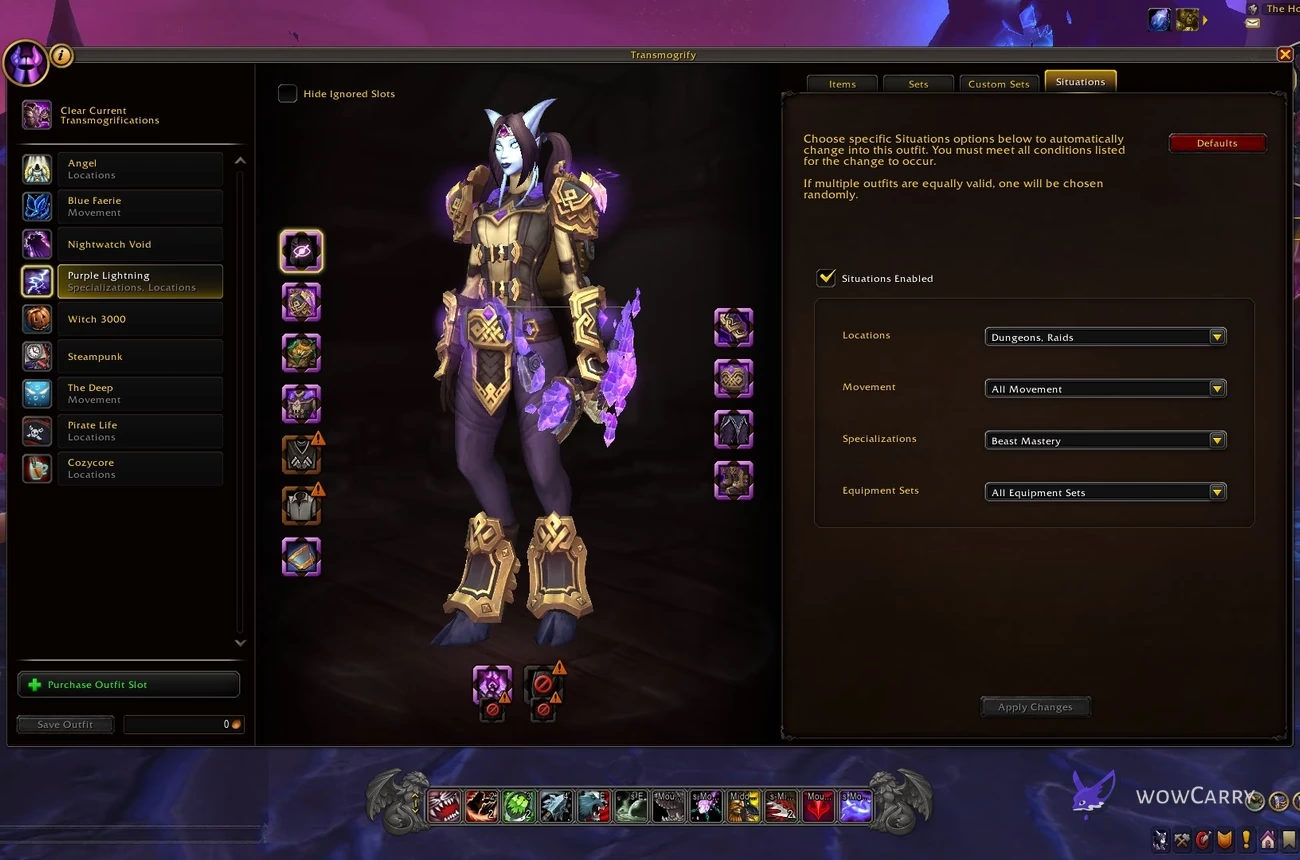
The Situations tab is a rules editor for each Outfit. Its own instruction is precise: every condition listed on the selected Outfit must be met for the change to occur. Selecting Raids under Locations and a particular specialization does not mean raid OR specialization; it means that Outfit qualifies while both are true.
| Situation category | Current choices | Useful setup |
|---|---|---|
| Locations | Rest Area, House, Character Select, World, Delves, Dungeons, Raids, Arena, Battlegrounds | Separate relaxed, open-world, and instanced looks. |
| Movement | Unmounted, Swimming, Ground Mount, Flying Mount | Give travel or swimming a dedicated Outfit. |
| Specializations | The character's available specializations | Match armor and weapon styling to the active role. |
| Equipment Sets | Saved Equipment Manager sets | Pair a look with a named gear loadout. |
| Racial Forms | Form choices available to the character | Use a different configuration for a supported alternate form. |
| Weather | Clear, Rain, Snow, Sandstorm | Add an environmental variant without editing the base Outfit. |
| Time of Day | Morning, Midday, Evening, Night | Rotate a light or dark version by the in-game period. |
When two or more Outfits satisfy the same complete rule, one is chosen randomly. That is useful for a pool of equally acceptable city looks, but it feels broken when a player expects priority. For deterministic behavior, keep one valid Outfit per exact condition combination and leave broader manual Outfits out of the Situations pool.
A Practical Situations Setup
Start small enough that every automatic change has an obvious reason. A five-Outfit layout covers most play without overlapping dozens of rules: one default manual look, one for Dungeons and Raids, one for House, one for Flying Mount, and one specialization-specific variation.
- Create the visual: assemble it under Custom Sets if it is still experimental, then select the Outfit Slot that should wear it.
- Save once: check every armor slot, both weapon slots, and the illusion preview before using Save Outfit and accepting the quoted cost.
- Open Situations: enable automatic selection only on the Outfits that should react to game state.
- Narrow one category first: choose House, Raids, Dungeons, or Flying Mount while leaving unrelated categories broad.
- Add a second condition only when needed: specialization plus Raids is useful when two roles need different raid looks, but it will not activate outside raids.
- Test the transition: move into and out of the chosen state, then inspect other enabled Outfits if the result changes randomly.
Keeping the general look manual provides a stable fallback. The specific Outfits then activate only when their narrow rules are satisfied, making it much easier to identify which condition caused a swap.
⚠️ A long checklist is not a priority system. If an Outfit requires House, Night, Rain, and a specific specialization, all four must be true before Situations can select it.
Players who intentionally want variety can reverse that advice. Give several Outfits the same complete condition set and let the random selection choose among them. The behavior is expected only when the candidates are equally valid.
Useful Patch 12.0.5 Outfit Controls
The /outfit x command changes to the Outfit whose order number is x in the transmogrification pane. Running /outfit with no number, or using /outfit x while that Outfit is already active, clears transmogs. Use /outfit !x when a repeated key press should keep the same Outfit instead of toggling it off. During Trial of Style, the event Outfit uses slot 0.
Weapon presentation also gained sheathing controls. The preview pane includes a Sheathe Weapon toggle, while supported weapons can offer placement choices or a hide-while-sheathed option. These settings belong in the final preview pass because a weapon that looks balanced in hand can clip a cloak or shoulder when carried.
Weather and Time of Day joined the Situation categories in the same update. They are best used as a second layer on an existing theme: a dark Night variation, a covered Rain look, or a bright Midday version. Making them the only rule on many Outfits creates a large random pool whenever that weather or time is active.
Patch 12.1 Ranged Weapon Illusions
Patch 12.1 extends weapon-illusion support to bows, crossbows, and guns. The wording is deliberately limited to a variety of illusions. A ranged character may own far more illusion appearances than the current weapon model can display, so the collection count is not a compatibility promise.
Open the weapon slot in the Outfit, select the illusion control, and preview the available choices on the actual ranged appearance. If a collected effect is absent, choose another supported illusion or weapon model rather than assuming the collection failed to synchronize.
✏️ Preview the ranged weapon both held and sheathed. Patch 12.1 adds the glow, but the weapon's shape and sheathing position still determine whether the final silhouette reads cleanly.
Saving an illusion is an Outfit edit and can contribute to the quoted appearance-change cost. Once that combination is saved, swapping back to the Outfit is free like any other completed configuration.
Current Appearance Farming in Midnight Season 2
The current class-set look comes from Season 2 sources, not the three-raid Season 1 distribution described by the old version of this article. Direct tier pieces come from The Venomous Abyss, while eligible Great Vault rewards and PvP provide additional paths. The Matrix Catalyst converts supported Season 2 armor into the matching class-set piece and appearance.
| Source item level | Season 2 class-set appearance | Collector check |
|---|---|---|
| 279-289 | Raid Finder | Preview the Catalyst output before committing a charge. |
| 292-302 | Normal | Confirm the source belongs to the current Season 2 pool. |
| 305-315 | Heroic | Check whether an upgrade can cross an appearance breakpoint. |
| 318 and above | Mythic | Keep the high-level source if the Mythic color is the target. |
The Catalyst has five power-set slots: Head, Shoulders, Chest, Hands, and Legs. Back, Wrist, Waist, and Feet can produce matching cosmetic pieces but do not add to the two-piece or four-piece bonus. Cosmetic conversions still consume a charge, so finish the combat set before spending charges on the surrounding look.
Collectors who want a specific current raid color can compare Season 2 raid runs, while broader legacy and class-set targets fit better when they browse WoW transmog farming options. In either case, name the exact set, class, color, and missing slots before planning runs.
Field Accolades began as the Patch 12.0.5 Void Assault currency and remain available in Patch 12.1, which added updated Season 2 caches to their vendors. Their void-themed appearance rewards are a separate collection goal; they do not replace the Venomous Abyss or Matrix Catalyst route for Season 2 class-set appearances. Season 1 tier-boss distribution is historical.
Troubleshooting Outfit and Situation Problems
Most failures come from mixing the three layers or from making Situation rules broader than intended. Check the saved Outfit first, then its complete condition set, then any equally valid competitors.
| Problem | Likely cause | Fix |
|---|---|---|
| A legacy look is missing from Outfits | Legacy saved appearances were converted into Custom Sets. | Find it under Custom Sets, apply it to an Outfit, and save. |
| A Situation never activates | At least one selected condition is false. | Review every category and remove the condition that is too narrow. |
| The Outfit changes to an unexpected valid look | Several enabled Outfits are equally valid. | Remove overlapping conditions or keep only one deterministic candidate. |
| An Outfit clears after a repeated macro press | /outfit x toggled the active Outfit off. | Use /outfit !x when repeated presses should preserve it. |
| A ranged illusion is absent | That effect is not supported on the selected ranged model. | Preview another compatible illusion or appearance. |
| Saving costs gold after a free swap | The appearance was edited after the Outfit was activated. | Separate free Outfit switching from paid appearance updates. |
For a clean test, disable automatic selection on every Outfit except the one being checked. Confirm it saves and activates manually, then enable one Situation category. Add more conditions only after the simple rule works.
Frequently Asked Questions
These answers cover the live Midnight rules that most often cause confusion when an older saved look meets the new Outfit interface.
Does equipping new gear remove my Midnight transmog?
No. Midnight stores the chosen appearance on the gear slot inside the active Outfit, so a compatible upgrade inherits that slot's look. The appearance can still fail when the new item is not compatible with the selected weapon or armor category, or when no Outfit is active. Equipping the upgrade itself does not charge another transmog fee; editing the appearance and saving the Outfit does.
How many Outfit Slots are available and what do they cost?
A Warband starts with two free Outfit Slots and can unlock up to 50. The third slot costs 100 gold, the first 20 cost 162,650 gold in total, and all 50 cost 2,012,650 gold. Later bands become much more expensive, so most players gain the practical benefit with five to ten slots. The purchase unlocks the slot Warband-wide, while saving appearances remains a separate quoted cost on each character.
Are Outfit Slot unlocks shared across the Warband?
Yes. An Outfit Slot purchase is account-wide through the Warband, so another character sees the unlocked capacity without buying that slot again. The outfits worn by individual characters are still configured for their usable appearances, armor type, and weapons. Treat the unlock as shared storage capacity, not as one identical wearable outfit copied onto every class.
Do Situation conditions use AND or OR logic?
Conditions within one Outfit use AND logic: every selected requirement must be true. An Outfit set to Raids, Night, and one specialization qualifies only when all three match. If several Outfits satisfy their complete rules at the same time, Situations chooses one randomly. Remove overlaps when you need a deterministic result, or keep equal rules intentionally when a random rotation is the goal.
Where did my pre-Midnight saved transmog sets go?
Previously applied transmogs and legacy outfits were converted into Custom Sets. Open the Custom Sets tab to find those saved designs, select the desired Outfit Slot, preview the set, and use Save Outfit to make it wearable. A Custom Set is free design storage; it does not automatically become an active Outfit and does not consume an Outfit Slot until assigned and saved.
Can bows, crossbows, and guns use weapon illusions in Patch 12.1?
Yes, Patch 12.1 allows those ranged weapon types to use a supported selection of weapon illusions. The update does not say that every illusion works on every ranged appearance. Open the illusion picker while the intended bow, crossbow, or gun is selected and rely on the available preview list. A missing effect usually indicates compatibility limits rather than a lost collection unlock.
How do I farm current Season 2 class-set appearances?
Use The Venomous Abyss, eligible Great Vault or PvP rewards, and the Matrix Catalyst. Catalyst output follows the source item's Season 2 level band: 279-289 maps to Raid Finder, 292-302 to Normal, 305-315 to Heroic, and 318 or higher to Mythic. Preview the result before spending a charge, and prioritize Head, Shoulders, Chest, Hands, and Legs before cosmetic-only set slots.
Do Season 1 tier and Field Accolades replace Season 2 class-set farming?
No. Season 1 tier distribution belonged to Midnight's three launch raids. Field Accolades remain current for Void Assault rewards, including appearance items and updated Patch 12.1 caches, but they are a separate collector lane. Midnight Season 2 class-set planning centers on The Venomous Abyss and the Matrix Catalyst. Keep the older raid colors and Field Accolade rewards on separate checklists instead of using either as the current tier-acquisition map.
Last reviewed 2026-08-26 against Patch 12.1 Curse of Ula'tek — Maintained by WowCarry's WoW team.