Start With the Item, Then Choose the Blacksmith Service
Use the Blacksmith to salvage unwanted gear, repair damaged equipment, add a chosen Temper and improve a keeper through Masterworking. These actions solve different problems. Repair restores durability; Tempering adds an affix; Masterworking develops the item's Quality. Salvage destroys the item.
Find a Blacksmith at the anvil icon on your town map. Zivek in Kyovashad is a familiar introduction, but you can manage equipment at other Blacksmiths rather than returning there for every visit. Select the service you need and read the selected item's requirements before confirming an action.
The current upgrade loop is Tempering and Masterworking, rather than repeatedly buying five Item Power on each rarity. Blizzard's live patch notes describe these systems and later changes. Check individual recipe prices in the game before spending.
Sort Keepers Before You Salvage
Compare the item's actual affixes, Legendary power and role in your build before judging it by its color or Item Power alone. A piece you cannot use immediately may still suit another setup or, if you own Lord of Hatred, a planned Horadric Cube craft. Put uncertain items aside instead of trying to recover them after salvage.
Mark equipment you want to keep as Favorite. Blizzard's 1.2 inventory update established that favorited items cannot be sold or salvaged. Check that you marked the correct copy before using a bulk action.
| What you found | Useful decision | What to protect |
|---|---|---|
| A possible upgrade or alternate-build piece | Compare it with your equipped item and intended crafting plan. | Keep and Favorite it while its role is unresolved. |
| An unwanted Legendary with a new or stronger Aspect | Check whether salvage will improve your Codex of Power. | Confirm you do not need the actual item first. |
| Unneeded equipment that unlocks a new appearance | Salvage it for the indicated Wardrobe unlock. | The appearance and the usable item are different things. |
| A duplicate with no useful Aspect, appearance or build role | Compare its sale value with your current material shortage. | Do not salvage a keeper just because a crafting bill is due. |
There is no universal rule that every drop should be sold or every drop should be salvaged. Selling supplies Gold; salvaging supplies materials and, where eligible, unlocks. An item already destroyed for materials cannot also fund your next repair bill.
Salvage for Materials, Appearances and Codex Upgrades
Open the Blacksmith's salvage service and inspect individual items before expanding to a bulk selection. Review what that selection includes; do not rely on old blanket claims that every Legendary or every modified item is automatically protected. Favorite your keepers and deliberately select the unwanted items.
Legendary salvage also maintains your Codex of Power. Blizzard's Loot Reborn itemization update introduced storing salvaged Legendary powers in the Codex and improving them through stronger salvaged rolls. Those learned powers can be reused for imprinting at the Occultist. Salvaging for an Aspect does not preserve the original equipment or automatically imprint your replacement.
For cosmetics, inspect whether salvage offers a new appearance. Salvaging eligible gear unlocks its look for the Wardrobe; simply wearing or storing the item is not the same action. Do not destroy equipment you still need merely to collect its appearance now.
Keep socketables separate from this decision. If a gem or Rune matters, remove or swap it before destroying the equipment rather than treating salvage as a guaranteed refund of every investment. Repair, socket management and gear salvage are different services. The Jeweler guide covers free swaps and socket management.
Material returns depend on the item being broken down. A salvage result is not a promise to recover all Gold, Tempering materials or Masterworking spending. Do not budget future crafts around a full refund, and treat a valuable Mythic Unique as a separate decision rather than ordinary inventory cleanup.
Repair Durability Before Another Attempt
After repeated deaths or a durability warning, visit the Blacksmith's Repair service. Choose the damaged equipment you intend to use, review the displayed Gold charge and confirm the repair. Check the item afterward before returning to the fight.
Repairing restores durability on the existing equipment. It does not improve the build, select a better affix or raise Masterworking Quality. If an item is about to be replaced, decide whether you need to repair it for the next attempt before spending on it.
Budget from the price in the menu rather than assuming every repair is cheap or costs the same amount. Keep enough Gold for repairs when considering optional crafting rerolls; running out of crafting materials and running out of repair Gold are different problems.
Temper the Affix Your Build Actually Needs
Learn a Tempering Manual, then choose a learned affix that the selected item can accept. Tempering no longer makes you gamble on which affix from a manual will appear. Its selected effect and the numerical value rolled for that effect are separate decisions.
The permanent itemization rework changed equipment to one Tempered affix. That does not mean only one attempt: the item has a separate supply of Tempering charges. The released charge allowance is one on Rare gear and three plus one per Greater Affix on Legendary gear and beyond. These are attempts, not extra affix slots. Read the counter and available affixes before spending.
- Learn the manual and open the Blacksmith's Tempering service.
- Select the equipment and inspect the affixes available for that item.
- Choose the effect your current build needs, then review its range, remaining charges and material cost.
- Apply the Temper and inspect the result. Decide whether improving that roll is worth another attempt.
- If you exhaust the item's charges, use a Scroll of Restoration when you want to continue: each scroll restores one charge, and an item can receive scrolls repeatedly.
Repeatable restoration prevents an exhausted charge counter from being the old permanent dead end. It does not make attempts free or guarantee the desired value within a fixed number of tries. Set aside the materials you need for your other equipment before chasing a marginal improvement.
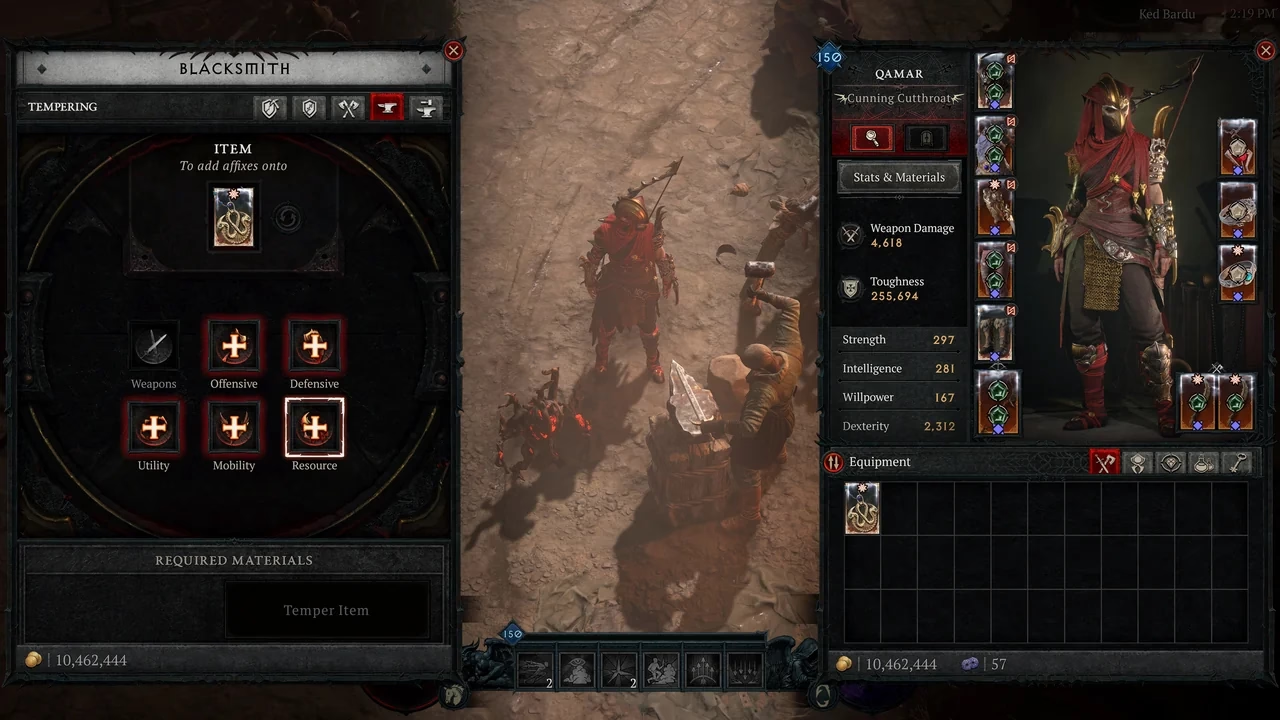
Cover: Blizzard's official 3.0 launch overview shows the Blacksmith Tempering interface at Ked Bardu with a Unique amulet selected. Credit: Blizzard Entertainment. It illustrates the service and categories, not a promise that every displayed character stat or interface detail is unchanged today.
The 3.0 update also opened Tempering to Unique and Mythic items. There is a further Mythic exception in the released 3.1 notes: affixes added through Tempering are maximum rolls when added to a Mythic Unique. Do not apply ordinary roll-chasing advice blindly to that case.
Masterwork Quality, Then Decide Whether to Chase the Capstone
Masterworking improves a keeper through Quality. Select it in the Blacksmith's Masterworking service, inspect the material bill and compare the preview with its current tooltip. Finish deciding whether this is the item you want to build around before investing heavily.
The released 2.5 Updates from PTR set the rules below. They supersede the earlier 20-Quality preview and the old twelve-rank system.
- Masterworking's Quality cap is 25. This is a Quality value, not a requirement to click the upgrade button 25 times.
- Each Masterwork grants 2-5 Quality, up to the cap.
- Quality improves the item's base properties and increases all affix values by 1% per Quality.
- At full Quality, the Capstone provides a 50% boost to one random affix, including the possibility of its Tempered affix.
Obducite funds the Quality upgrades. The selected Capstone can be rerolled with Neathiron without resetting the item's Quality. A new Capstone roll is still random: choose a stopping point based on the affixes your build needs rather than assuming the next payment will hit the desired one.
Masterworking no longer requires the item to have been Tempered first. Choosing the right item and applying its intended Temper before chasing the final bonus is a useful spending order, rather than a hard eligibility rule. If the Capstone lands on a useful Temper, judge that benefit in the context of your build.
The released notes also make Masterworking costs rise with Quality. Do not multiply one early upgrade's price by a fixed number of clicks to predict the total bill: gains vary, later costs differ, and optional Capstone rerolls add another decision.
Keep the Right Materials for the Next Action
Use the recipe's own material names to identify your shortage. Salvage resources, Masterworking currency and restoration scrolls have different jobs; collecting more of one does not necessarily unlock the action you selected.
- Rawhide, Iron Chunks, Veiled Crystals and Legendary salvage
- These are crafting-resource families, not a universal five-tier upgrade ladder. Check the selected item's recipe instead of assuming every service consumes all of them.
- Forgotten Souls
- Reserve them for the recipes you are actually using. The 3.1 update added an Alchemist conversion from Baleful Fragments to Forgotten Souls; check that conversion's full cost before spending a reserve needed elsewhere.
- Obducite
- Used to develop Masterworking Quality. If this is the shortage shown, extra Tempering charges will not pay the bill.
- Neathiron
- Used for the Masterworking Capstone reroll, a different expense from building Quality.
- Scrolls of Restoration
- Restore one Tempering charge per use. Repeated use is allowed, but it does not refund the materials spent on the attempts.
- Resplendent Sparks
- Mythic salvage and crafting make these a separate long-term decision. Compare the item you would destroy with the exact Mythic crafting route you plan to use.
For a quickly replaced leveling item, a useful chosen Temper may solve the immediate problem without a prolonged search for a perfect roll. For an endgame keeper, confirm the desired affixes first, then develop Quality and consider the Capstone. Your other slots may gain more from their first meaningful improvement than this one does from another reroll.
Forge Caches and the Horadric Cube Are Separate Choices
The Blacksmith's Forge > Mythic Cache route creates a random result from the selected cache's pool. The Season of Hell's Legacy overview documents a second Blacksmith cache option restricted to Iconic Mythics. Read the pool and complete cost before spending; a random cache is not an order for one specific item.
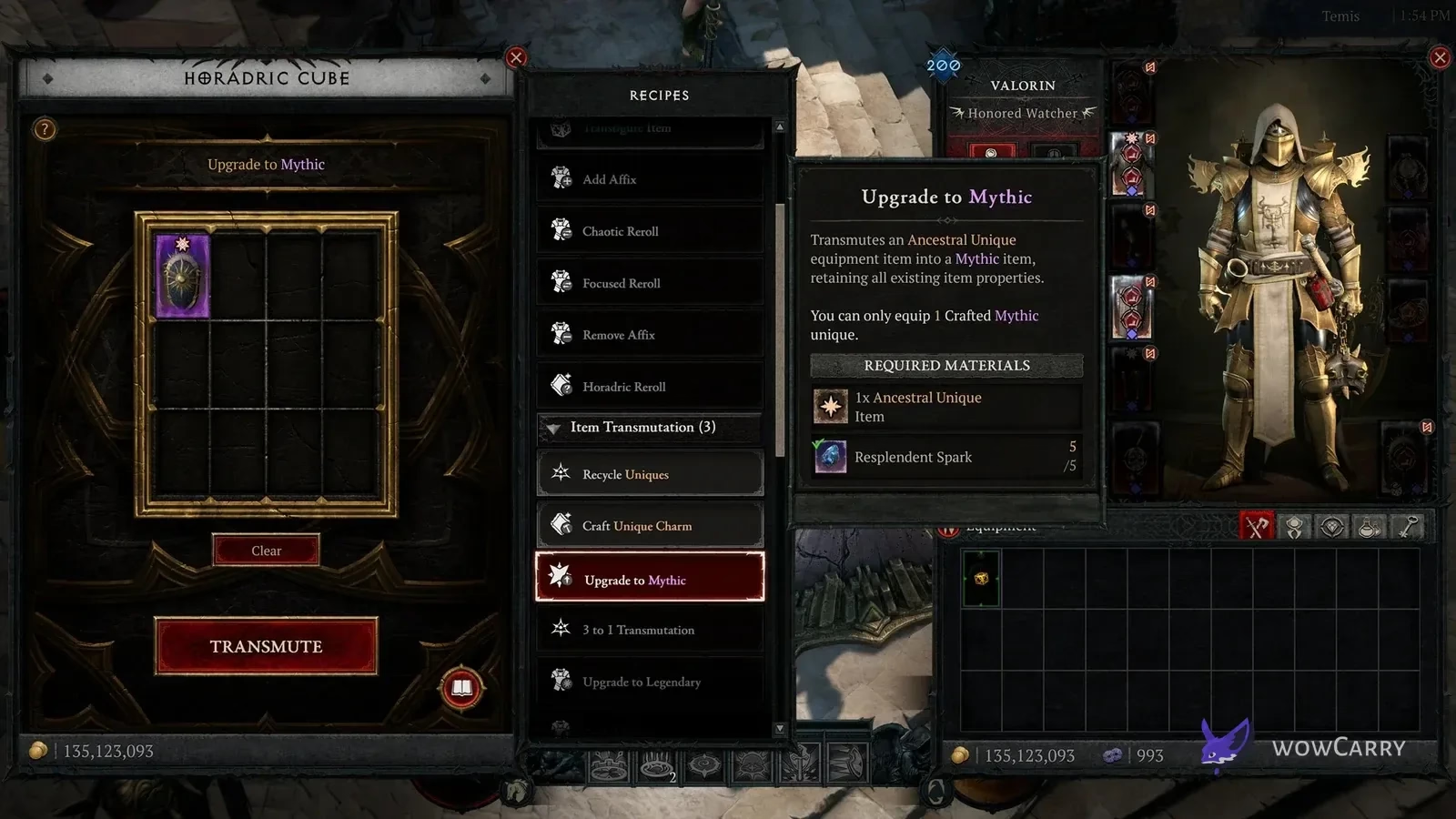
The Jeweler's Rune Crafting > Mythic Uniques recipes and the Cube's Upgrade Direct Item to Mythic are different routes. The latter preserves a chosen eligible item's affixes and modifications, but cannot use an Unmodifiable item. It applies a Crafted tag, and you can equip only one item carrying that specific tag. The Blacksmith and Jeweler routes do not apply this tag; they should not be confused with the Cube's direct upgrade.
The Horadric Cube is unlocked during the Lord of Hatred campaign and is available in Temis. If you are planning a Cube craft, check that recipe before salvaging its potential base. Ordinary Blacksmith repairs, Tempering and Masterworking are not substitutes for the Cube's item-transforming recipes.