WoW Patch 10.2 Boomkin (Moonkin Form) Customization Guide
How Balance Druids restyle their Moonkin Form: the Body and Adornment options from Patch 10.2, plus the randomizing Glyph of the Lunar Chameleon.
By:
John Langan
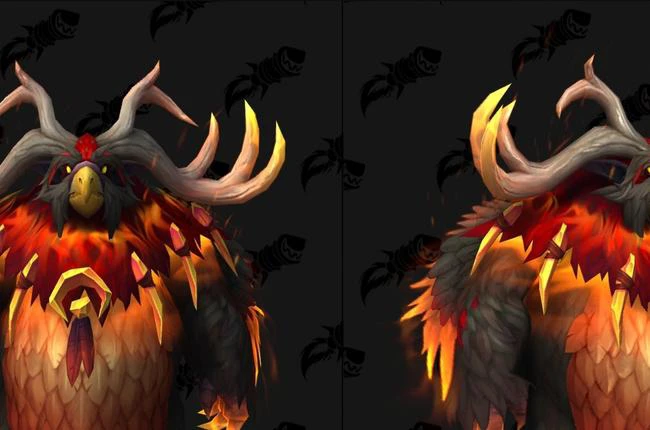
Here is how Boomkin appearance customization actually landed, and what each option does.
For years the Balance Druid Moonkin Form was a fixed silhouette: your race and hair color changed the details, but two Boomkins of the same race looked identical. That changed when the customization system was datamined on the Patch 10.2 Public Test Realm in October 2023 and then shipped to live servers with Patch 10.2 "Guardians of the Dream" on November 7, 2023. It was not held back to a later minor patch; the full pane arrived with 10.2 itself.
The system works like the Worgen and Dracthyr appearance panes. You visit any Barber Shop in a capital city, sit in the chair, and select the Moonkin icon in the top-right corner. The options are split into two tabs, Body Options and Adornment Options, and each of your Druid forms is customized on its own, so your Moonkin look is set independently from Cat, Bear, and Travel Form.
Body Options govern the shape of the owlkin itself: its feathers, horns, beak, and facial features. The Full Transformation toggle sits at the top of this tab and decides how heavily shifted the model reads.
| Body Option | Choices |
|---|---|
| Full Transformation | Switches between the fully shifted Moonkin model and a lighter, partial transformation |
| Feather Color | Blue/White, Black/Red, Blue/Green, Fawn/Brown |
| Horns | Stag High, Stag Low, Grand High, Grand Low, Arched, Swirl |
| Horn & Beak Color | Six pairings that tint horns and beak together |
| Beak | Parrot, Medium, Raptor, Parakeet |
| Eyebrows | None, Medium Straight, Small Droop, Short Straight, Long Droop, Very Short, Long Straight |
| Whiskers | Long Droop, Braided, Thin, Thick Droop, Majestic |
| Feathers | None, Standard, Long, Short |
With the base body dialed in, the second tab layers the decorative and magical flourishes on top.
Adornment Options are the jewelry and spell-effect layer. They control the trinketry hanging off the model and the glow that surrounds it while you cast.
| Adornment Option | Choices |
|---|---|
| Decorations | None, Standard, Gemstones, Leaves, Cord |
| Decoration Color | Four color pairings for whichever decoration you pick |
| Effects Style | None, Moon, Swirl, Starlight, Body |
| Effects Color | Six options for the glow around the form |
Between the two tabs there are enough combinations that same-race Moonkins rarely look alike anymore, which was the whole point of the update.
For players who cannot settle on one look, the Glyph of the Lunar Chameleon (item 211400) shipped alongside the customization pane. It is a minor glyph, and its effect is exactly what it sounds like: every time you shapeshift into Moonkin Form, the game randomizes your appearance from the available options. No two transformations look the same.
The glyph is a scribe craft. A player with Dragon Isles Inscription learns it from Technique: Glyph of the Lunar Chameleon, then crafts the glyph itself, so most Druids simply buy a stack from the Auction House and apply it like any other glyph. Because it overrides the fixed barbershop selection with a random roll, it is an either/or choice: use it for variety, or set a look you love in the Barber Shop and skip the glyph.
Accessing all of this is free and repeatable. Travel to a Barber Shop in any major city, interact with it to open the customization screen, and choose the Moonkin icon in the upper-right. From there, tab between Body Options and Adornment Options, preview each change on the live model, and confirm. There is a modest gold cost per visit, the same as changing your hairstyle, and you can return as often as you like.
Because each Druid form has its own saved appearance, players who main Balance can invest in a distinctive Moonkin without touching their Feral or Guardian looks. Anyone who wants to spin up a fresh owl to experiment can level a Balance Druid to endgame and start restyling from the first Barber Shop visit.
It launched with Patch 10.2 "Guardians of the Dream" on November 7, 2023. It was datamined on the 10.2 PTR the month before, and the complete pane shipped with the patch rather than being delayed to a later 10.2.x update.
Visit any Barber Shop in a capital city, open the customization screen, and select the Moonkin icon in the top-right corner. Options are split across a Body Options tab and an Adornment Options tab, and changes apply instantly to the previewed model.
The Glyph of the Lunar Chameleon (item 211400) is a minor glyph that randomizes your Moonkin appearance each time you shapeshift into the form. It replaces your fixed barbershop selection with a fresh random roll on every transformation.
It is crafted by a scribe with Dragon Isles Inscription, who learns it from Technique: Glyph of the Lunar Chameleon. Most players buy the finished glyph from the Auction House and apply it like any other minor glyph.
Yes. Moonkin Form, Cat Form, Bear Form, Travel Form, and the others each store their own appearance, so restyling your Boomkin has no effect on your other shapeshifts.
No. Every Barber Shop customization is available without any glyph. The Glyph of the Lunar Chameleon is only for players who specifically want a randomized look instead of a fixed one.
There is a small gold fee per Barber Shop visit, identical to a normal hairstyle change. It scales gently and is trivial at endgame, so you can revisit and tweak your Moonkin appearance as often as you want.
Last reviewed 2026-07-02 against Patch 10.2 Guardians of the Dream. Maintained by WowCarry's WoW team.