WoW 12.1 Addon and Aura Changes at a Glance
In Blizzard’s 12.1 update notes, Patch 12.1 changed the supported path for addons that display buffs and debuffs. Blizzard added APIs that can present filtered aura sets in custom layouts without exposing the underlying aura information that could be used for combat automation. The practical result is narrower than “addons are gone” and more specific than “everything works again”: an aura-display addon needs a release written for the 12.1 path, while unrelated features must be tested separately.
Key Takeaways
- Patch 12.1 Curse of Ula'tek added APIs for customized displays of filtered auras while withholding the underlying combat-automation data.
- Blizzard says addons that display auras need updates for the new APIs; an installed addon or a successful login does not prove its aura module is current.
- The Cooldown Manager now tracks supported trinkets, potions, and racial cooldowns or durations as a first-party fallback.
- Patch 12.1 also added healer group-buff alerts, separate group-frame aura sizing, more ping targets, and new friendly-nameplate options.
- New UI texture filenames are no longer published to the ManifestInterfaceData DB; existing filenames remain available and addons can still use those textures.
- An addon can still customize how a filtered aura set supplied through the API looks, but Blizzard's announcement does not certify any named addon or every imported profile.
- A safe repair order is update, test the default UI, enable addons one at a time, and reserve a full interface reset for the final diagnostic step.
That distinction keeps troubleshooting focused. Test the exact display that failed instead of treating every bag, map, damage meter, nameplate, and aura feature as one all-or-nothing system.
October Compatibility Review: 12.1.5 and Your Addon Release
Use the current client for the compatibility test. The 12.1 API transition remains the background to this guide; the live content update at this review is 12.1.5. A release labeled for the earlier transition is not evidence that every module or imported profile has been tested on your exact build.
There is a concrete reason to read feature-specific notes: TellMeWhen’s maintainer changelog introduced a combat-allowed aura icon type in addon version 12.1.0 and distinguishes it from the older combat-restricted type. Later entries describe additional aura behavior and fixes. These are the addon’s own version numbers. Importing a profile that still uses an older icon type can require a different remedy from simply installing the latest files.
This example verifies a documented adaptation, not every imported package or a recommendation to replace a working UI. Match the feature, target unit and combat context to the maintainer’s description before assuming two similarly named icons behave identically.
For the native alternative, the 12.1.5 notes add Splinterstorm buff tracking for Spellslinger and new health/dispel accessibility options. See the updated Cooldown Manager guide for those specific additions. They do not certify the behavior of unrelated addon modules.
How the Filtered Aura API Works
World of Warcraft calls buffs and debuffs auras. Before deciding whether a display is broken, separate two jobs: reading combat information and drawing a visual element. Blizzard's 12.1 model allows an addon to request filtered aura displays and customize their presentation, while the game keeps the underlying information that could drive combat automation out of that addon path.
The API is not a universal compatibility badge. A familiar-looking 12.1 display does not restore access to the underlying aura data, and Blizzard explicitly says aura-displaying addons need updates for the new APIs. Separately, new UI texture filenames are no longer added to the ManifestInterfaceData DB. Existing filenames remain available, addons can still use those textures, and Blizzard says the change should not affect players.
📌 Compatibility rule: a “12.1” label matters only for the version you installed and the feature you use. Verify the release date, game branch, and aura-specific notes before importing an old profile.
Blizzard's announcement does not publish a list of compatible projects. That is why this guide avoids claiming that a named addon works or fails across every release, module, and character setup.
What Still Works, What Needs an Update, and What Is Unknown
Use three buckets. “Supported” describes the capability Blizzard documents. “Update required” describes aura-display code that must adopt the new APIs. “Version-specific” covers individual projects, modules, imports, and conflicts that players must test against the exact Retail release.
| Question | Answer | Verification |
|---|---|---|
| Can addons present filtered auras in custom ways? | Yes, through the new 12.1 APIs. | Blizzard's addon-and-aura announcement and content notes. |
| Will an older aura module keep working unchanged? | Do not assume it will. | Check for a 12.1 Retail release and aura-specific author notes. |
| Does a settings window prove the combat display works? | No. | Test the actual aura display in the relevant combat state. |
| Are all non-aura addons unaffected? | Test them separately. | Check each project after updating the game and its files. |
| Does 12.1 restore every pre-Midnight workflow? | Do not assume it does. | Compare the current result with the feature you actually need. |
| Can addons still use existing UI texture filenames? | Yes. | Existing filenames remain available; new filenames no longer enter ManifestInterfaceData DB. |
This classification also prevents two common mistakes: keeping stale files because one panel opens, and deleting a complete interface because one aura module changed. The symptom tells you which layer to test next.
Default UI Tools That Cover Common Aura Jobs
Patch 12.1 expanded the first-party interface at the same time as the addon API change. The Cooldown Manager can track supported trinkets, potions, and racial ability cooldowns or durations. Healers can assign visual alerts to specific group buffs, and raid or party-frame buff and debuff icons can use independent sizes and border scales.
The patch also expanded pings for supported spells, certain items, player resources, and selected unit frames. Friendly nameplates gained options for name-only display, class-colored names, and hidden realm names. These additions do not reproduce every custom layout, but they provide a clean baseline while an addon author updates a display.
Start with one decision per visual region. Put major personal cooldowns near the center, keep group-buff alerts on group frames, and use nameplates for target information. If the native tracker is new to you, set up the Cooldown Manager before layering another display over the same icons.
✏️ Overlap check: when one cooldown appears twice, disable the custom copy first. Confirm that the native Cooldown Manager carries the information you need before spending time repairing a duplicate.
Edit Mode remains the right place to reveal, move, and size supported first-party frames. It fixes layout geometry, not an outdated addon API call, so use it to establish the baseline rather than as a cure for every Lua error.
A Clean Update Checklist for the Current Retail Build
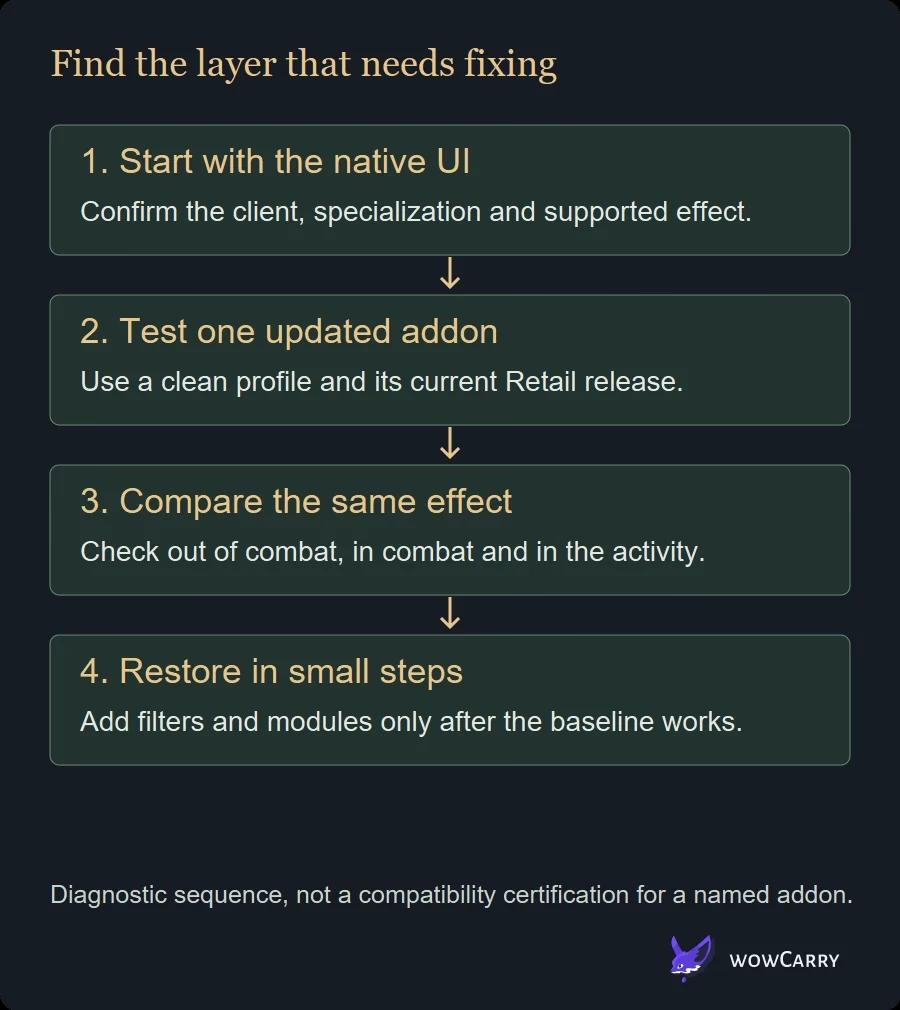
Change one layer at a time and keep a record of the last known working state. The goal is to work out whether the problem comes from the game build, the addon version, one imported configuration, or an interaction between displays.
- Exit World of Warcraft completely before replacing addon files.
- Update Retail and confirm the actual client build. At this October 18 review, the live content update is 12.1.5.
- Install the current Retail release from the addon's normal project page or updater.
- Read the installed release’s aura, buff, debuff, unit-frame and nameplate notes. The addon version number is separate from the game patch number.
- Log in with all custom addons disabled and verify the same job in the default UI.
- Enable the suspect addon by itself, restart the UI or client as its author directs, and test again.
- Add the remaining addons in small groups until the symptom returns.
- Record the game build, addon version, character, specialization, content type, and exact error text.
A training dummy or low-risk open-world target is enough for the first pass. Then repeat the check in the content where the problem occurred, because an aura display can behave differently outside combat, in a group, or on another unit.
⚠️ Import warning: a current addon with an old profile is not a clean 12.1 test. Try the default profile before concluding that the current release itself is broken.
When a clean profile works, rebuild only the filters and visual settings you can verify. Do not copy an entire pre-12.1 package back into place before identifying which component caused the failure.
Troubleshoot Missing Auras, Lua Errors, and Duplicate Icons
Use the visible symptom to choose the next test. A missing aura, a Lua error, and a duplicated icon can happen on the same screen, but they point to different checks.
| Symptom | Likely layer | Next test |
|---|---|---|
| The addon is absent from the character-select list | Install location or game branch | Confirm the files are in the Retail Interface/AddOns folder and that the download targets Retail. |
| Settings open, but a buff or debuff display is empty | Aura module or imported filter | Check for a 12.1 aura update, then test the addon's default profile. |
| The display works out of combat but fails in the relevant fight | Combat aura compatibility | Use the native display as a control and check the author's current 12.1 notes. |
| A Lua error appears immediately after login | Stale code or library conflict | Capture the first error, disable all other addons, and retest the same version alone. |
| The same cooldown or buff appears twice | Native and custom overlap | Disable one display, then assign each remaining region one job. |
| Only one character or specialization is affected | Saved profile or active build | Compare a clean profile on that character and note the exact specialization. |
| Frames stutter after enabling several projects | Conflict or workload | Re-enable in small groups and stop when the performance issue returns. |
Always preserve the first reproducible error. Later errors can be consequences of the first failure, so a long stack of messages is less useful than one clean test with the exact versions and reproduction steps.
Reset the Interface Without Losing Your Only Copy
A full reset is useful only after update, isolation, and clean-profile tests fail. Blizzard's user-interface reset procedure says to exit the game and rename the Cache, Interface, and WTF folders to CacheOld, InterfaceOld, and WTFOld. For the longer backup and restore sequence, read the WoW UI reset guide.
Renaming is safer than deleting because Interface contains addon files and WTF contains saved settings. If the clean client fixes the problem, restore only the data you understand or reinstall current addon versions, then retest. Copying every old folder back at once also copies the fault back.
⚠️ Reset boundary: do not begin by deleting WTF. First disable the suspect addon, test the default UI, and try a clean profile. Rename all three folders only when you need Blizzard's full diagnostic reset.
If the clean client still shows the same issue, the cause is less likely to be the removed addon files. Record the build and steps, check current Blizzard known issues, and report the reproducible behavior through the appropriate support or bug-report path.
Validate the UI for Raids, Mythic+, and PvP
A layout is not finished when it looks tidy at a target dummy. Validate it against the information density of the content you play. Keep the test small: one role-critical buff, one defensive, one item cooldown, and one target effect before expanding the setup.
| Context | First checks | Failure to avoid |
|---|---|---|
| Healer | Group-buff alert, debuff readability, icon size, and mana visibility | Hiding a native group-frame signal before the custom replacement is proven. |
| Tank | Personal defensive, active mitigation, target effect, and item cooldown | Stacking duplicate icons across the center and group frames. |
| DPS | Major cooldown, supported proc or buff, target effect, and potion timing | Assuming an imported filter still maps to the current specialization. |
| Raid or Mythic+ | Boss warnings, personal cooldowns, group frames, and target readability | Turning every available signal into a central alert. |
| PvP | Friendly and enemy nameplate readability, group frames, and defensive alerts | Copying a PvE layout without checking arena or battleground visibility. |
Players rebuilding arena or battleground layouts can review the Midnight PvP UI after the 12.1 compatibility pass. Keep separate PvE and PvP tests when the same addon uses different modules or profiles.
FAQ
Does a 12.1-compatible addon automatically work on 12.1.5?
Compatibility must be checked for the installed release, feature and client build. A successful aura display does not certify every unit-frame module or old imported profile.
Should I enable Load out of date addons to fix an aura?
That checkbox does not rewrite an addon for changed APIs. First install the current Retail release and read the maintainer’s notes. Test a clean profile and the equivalent native signal before accepting a workaround.
Why does an imported icon fail when a new one works?
An import can use a legacy icon type, filter or dependency even when the addon files are current. Compare its type and target unit with the maintainer’s current example, then rebuild one small test.
Can I assume every named addon is certified by this review?
No. This is a compatibility troubleshooting guide with one documented maintainer example. No complete addon package or live-game profile was tested by the editorial team.
What changed in the native UI in 12.1.5?
The notes add Spellslinger Splinterstorm as a trackable buff, animated raid-frame dispel cues and a configurable low-health audio pulse. Each solves a specific display need rather than restoring every older aura behavior.
What should I record before reporting a bug?
Record the client build, addon version, specialization, relevant talents, exact aura or spell, profile, target unit and whether the failure occurs out of combat, in combat or only in a particular activity.
Maintained by WowCarry's editorial desk. AI-assisted source research; no first-hand gameplay testing is claimed. Last reviewed 2026-10-18. The 12.1 API explanation is retained. The current-build checklist, maintainer example and FAQ were added; no universal compatibility or first-hand addon testing claimed. Original URL, author and cover retained.
Frequently Asked Questions
Did Patch 12.1 disable all WoW addons?
No. Blizzard's Patch 12.1 announcement addresses aura information and the APIs used to display filtered buffs and debuffs. It does not say that every addon category is disabled. An individual project can still need an update for unrelated game changes, so test the exact Retail release and feature instead of labeling the complete addon folder compatible or incompatible.
Do aura addons need a special 12.1 update?
Yes. Blizzard states that addons which display auras need to support the new APIs introduced with Curse of Ula'tek. Check the installed version, release date, Retail branch, and author notes. A configuration window opening successfully is not enough; verify the actual buff or debuff display with a clean profile in the state where you use it.
Can addons still customize buffs and debuffs in 12.1?
Yes, within the new filtered-display model. Blizzard says addons can show filtered aura sets in customized ways while the underlying aura information that could support combat automation remains unavailable through that path. Test old triggers, imports, conditions, and decision workflows on the current addon release instead of assuming they return unchanged.
Why does my addon load while its aura panel stays empty?
An addon can contain separate modules for settings, frames, profiles, and aura handling. The settings panel may load even when the aura module is stale or an imported filter no longer matches the current implementation. Update the addon, disable other projects, test its default profile, and compare the same information in WoW's native interface before changing every saved setting.
Should I delete the WTF folder after a 12.1 error?
Not as the first step. WTF contains saved interface settings, so deleting it removes useful evidence and your only local copy. First update the addon, disable it, compare the default UI, and test a clean profile. If a full reset becomes necessary, follow Blizzard's procedure and rename Cache, Interface, and WTF to Old variants while the game is closed.
Can the Cooldown Manager replace an aura addon?
It can replace some common tracking jobs. In Patch 12.1, the Cooldown Manager supports selected abilities plus supported trinkets, potions, and racial cooldowns or durations, while group frames gained more aura controls. Blizzard does not claim that the native tool reproduces every custom alert or filter, so compare the decision you need rather than expecting a one-for-one visual copy.
Which named addons work with WoW 12.1?
There is no durable universal list in Blizzard's announcement. Project status can change by release, module, game branch, and imported profile. Use the addon's official release page to confirm a current 12.1 Retail build, read its aura-specific notes, and test it alone. This article does not label a named addon working or broken without a source tied to that exact version.