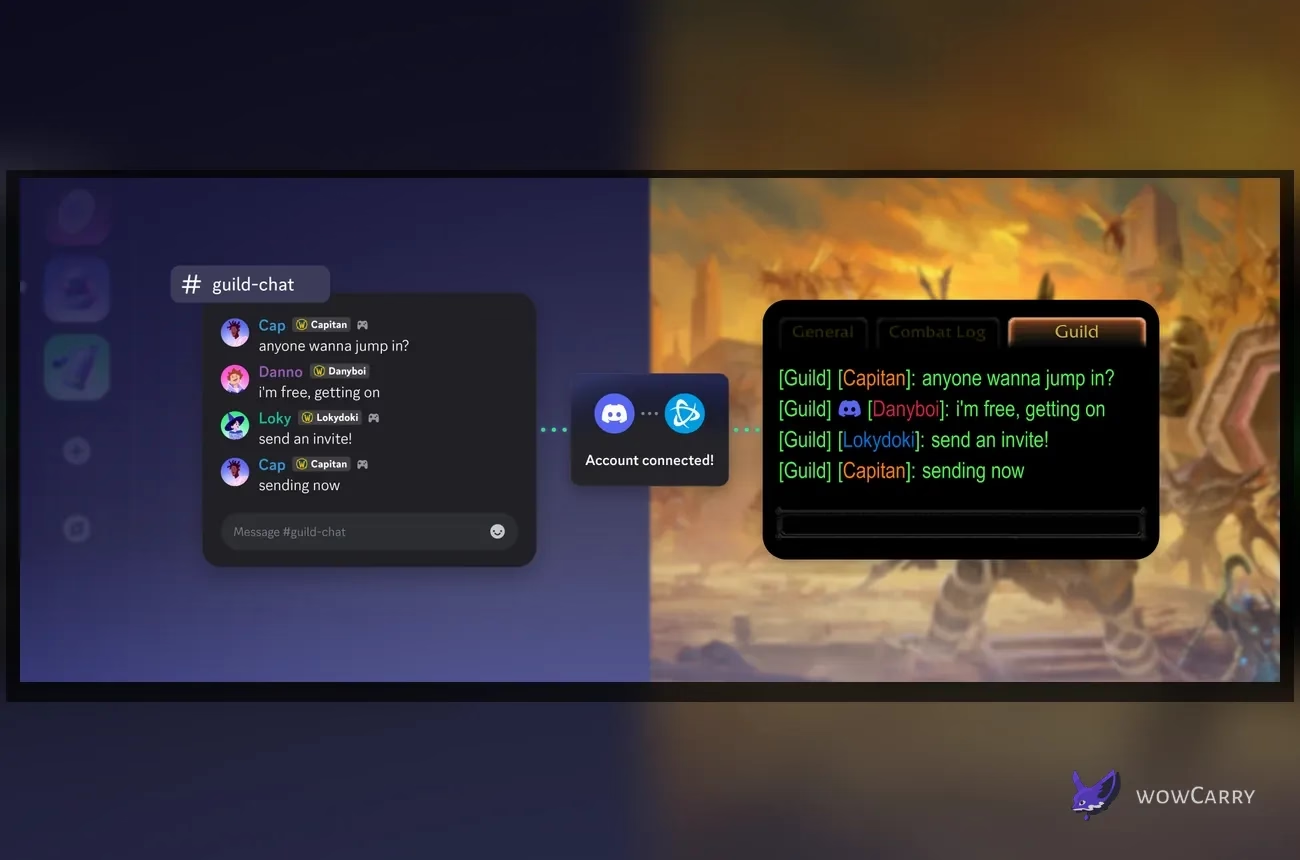
WoW Discord Integration at a Glance
World of Warcraft now supports two-way text chat between a WoW guild and one linked Discord channel. Messages travel from that channel into WoW and from configured guild chat into Discord. Players connect Battle.net to Discord for personal relay, while a guild leader or authorized officer separately links the guild to an eligible text channel. Blizzard has not announced in-game Discord voice, screen sharing, direct-message sync, or a combined friends list for this release.
Key Takeaways
- Patch 12.1 Curse of Ula'tek added official two-way text chat between a WoW guild and a selected Discord channel.
- Linked Guild Chat separates personal Battle.net-to-Discord relay from the guild leader's channel link.
- The Discord user who links the channel needs Manage Channels, View Channel, and Send Messages in that destination.
- WoW guild leaders can route Discord traffic into regular /guild chat or keep it in a dedicated /discord channel.
- The Display Name setting supports Default, Last Online Character Name, and Discord Global Name for messages arriving from Discord.
- Linked Channels bypass Discord-side role restrictions inside the game chat: every member of the linked WoW guild can read and reply in-game, so never link an officer or private channel.
The safest rollout uses a new Discord text channel whose contents are suitable for the whole guild, one officer, and two linked members. Never test with an officer, leadership, moderator, or otherwise private channel.
What the Integration Syncs
The bridge connects one guild chat to a Discord text channel chosen by leadership. An offline guildmate with channel access can answer from Discord while players remain in WoW. Incoming Discord messages carry a Discord icon in the WoW feed.
On Discord, a controller indicator marks game-originated chat. Blizzard's examples also show a WoW label and character identity, helping moderators identify where a relayed message originated.
The bridge is deliberately narrower than Discord's complete platform. The Discord Social SDK names this feature Linked Channels: one game chat connects to one server text channel. Blizzard does not document officer chat, Battle.net whispers, Discord direct messages, voice, calls, video, reactions, threads, attachments, or raid invites for WoW.
📌 Scope check: configure the bridge for guild text. Do not plan a raid around Discord voice appearing inside WoW, because Patch 12.1 does not advertise an in-game voice client or call controls.
An unlinked member can still read and reply through WoW. On Discord, Blizzard's example replaces that player's relayed message content with a notice that the sender has not linked an account. Personal linking remains individual after the guild channel is connected.
Requirements Before You Start
One person can connect their accounts, link the WoW guild, and grant channel access, but the channel step still requires authority on both sides.
| Role | Required access | What that person does |
|---|---|---|
| Member using personal relay | Own Battle.net and Discord accounts | Authorizes the personal connection and selects a display name. |
| Guild leader or officer | Correct WoW guild permissions | Opens Guild Settings and links the WoW guild to a channel. |
| Discord channel linker | Effective Manage Channels, View Channel, and Send Messages | Selects an eligible server text channel that is not age-restricted or linked elsewhere. |
A linkable destination must be a text channel in a Discord server, cannot be age-restricted, and cannot already be linked to another game lobby. The linking user also needs effective Manage Channels, View Channel, and Send Messages. Check inherited category permissions and explicit channel overrides because both affect the final permission result.
Eligibility does not mean privacy. Discord permits a private channel to be linked when the linking user can access it, but Discord-side role restrictions are not enforced inside the game lobby. Assume every member of the linked WoW guild can read and reply in-game. Create a dedicated #wow-guild-chat channel containing nothing that must remain limited to officers, moderators, or selected roles.
How to Link Battle.net and Discord
Players can begin inside WoW or from Discord. The in-game route uses Escape → Options → Social → Enable Discord Functionality. WoW then opens the authorization flow. Be signed into the intended Discord account, read the requested permissions, approve the connection, and return to the game to confirm that the option shows the connected state.
- Launch the current Retail WoW client and open the Game Menu with Escape.
- Select Options, open the Social tab, and choose Enable Discord Functionality.
- Continue to Discord and verify that the displayed Discord identity is the one you intend to use.
- Review the authorization screen, approve it, and complete the confirmation prompts.
- Return to the Social tab and choose Default, Last Online Character Name, or Discord Global Name under Display Name.
Discord also offers the account-side route. Open User Settings, find the connected-apps area, reveal more services if necessary, then select the Battle.net logo. Official guides use different labels for this area across client surfaces, so follow the Battle.net icon rather than expecting one desktop, browser, and mobile label.
If Battle.net was connected to Discord before Patch 12.1, Discord warns that the existing connection may need an update. Reopen the Battle.net entry, review the current permissions, and finish any new authorization prompt before troubleshooting the guild link itself.
✏️ Identity check: read the Discord account name on the approval screen before selecting Authorize. A technically successful connection to the wrong personal Discord identity will not expose the server and channels you expected in WoW.
At this point only the personal account connection is complete. The guild chat does not begin syncing until leadership performs the separate channel step.
How to Link a WoW Guild to a Discord Channel
The channel link is completed inside World of Warcraft. A guild leader or officer with the correct WoW permissions opens the guild interface, then selects an eligible Discord server text channel. Prepare a channel whose contents are safe for the whole guild before using Blizzard's path.
- Press J to open Guild & Communities.
- Select Roster on the right side of the panel.
- Select Guild Settings in the lower-right corner.
- Open the Guild Control dropdown and choose Discord Settings.
- Select the Discord server that contains the guild-wide text channel.
- Choose a channel that is not age-restricted or linked to another lobby.
- Select Link and approve the final confirmation.
- Send one plain test message from WoW and one from Discord.
If the server list is empty, confirm the officer's personal connection and server membership. If the server appears but the channel does not, verify that it is a server text channel, is not age-restricted, is not linked elsewhere, and grants effective Manage Channels, View Channel, and Send Messages after category and channel overrides.
Use harmless test lines such as “WoW to Discord test” and “Discord to WoW test.” Confirm both directions, source icons, display name, and destination tab. Because in-game access bypasses Discord roles, perform this test only with content suitable for every guild member.
⚠️ Two-link warning: seeing Battle.net listed in Discord proves only the personal link. The guild bridge still needs Guild & Communities → Guild Settings → Discord Settings inside WoW.
Once both directions work, leadership can choose whether Discord traffic belongs in the regular guild stream or a dedicated in-game chat channel.
Choose the Chat Route and Display Name
WoW supports two in-game routing patterns for incoming Discord traffic. Merging it into /guild keeps one continuous conversation, while a dedicated /discord channel separates remote chatter from game-native guild messages. Neither option changes the Discord destination; it changes how the bridge is presented inside WoW.
| Setting | Best use | Tradeoff |
|---|---|---|
| Regular /guild chat | Small guilds that want one shared conversation | Discord traffic can make the main guild tab busy. |
| Dedicated /discord channel | Separating remote messages for the whole guild | It is not private; guild members can still read and reply in-game. |
| Default display name | Let WoW use its current game-defined default | Blizzard currently maps this to the last online guild character. |
| Last Online Character Name | Keep a recognizable WoW identity in guild discussion | The visible character may change after another guild alt logs in. |
| Discord Global Name | Match the identity guildmates already know on Discord | The name may differ from the player's WoW characters. |
For a first deployment, a dedicated /discord channel makes errors easier to spot. It only separates traffic inside WoW; it does not restore Discord role restrictions or create officer privacy. Leadership can change the filter after members understand the icons.
Display Name is a personal identity decision. Default currently uses the last online character, and the explicit Last Online Character Name setting does the same job in a more obvious way. Discord Global Name is clearer for communities that organize primarily on Discord. Pick the option that lets guildmates identify the speaker without exposing more identity than the member wants to display.
Privacy, Visibility, and Moderation
The personal Discord connection is optional, and its authorization screen shows the requested permissions. Channel privacy is a separate issue: Discord role and member restrictions apply in the Discord client, but Linked Channels do not carry those restrictions into the game lobby. A WoW guild member who cannot open the channel in Discord can still read and reply through the linked in-game chat.
That behavior makes officer, leadership, moderator, recruitment-review, and other limited-access channels unsafe choices. Link only a dedicated channel whose history and future messages are suitable for every member of the WoW guild. A lock icon or restrictive Discord role is not an in-game privacy boundary.
Personal disconnection and channel unlinking are different actions. To remove the personal Battle.net link, open Discord Connections, select the X beside Battle.net, and confirm Disconnect. To remove the guild bridge, use WoW Guild Settings → Discord Settings, or use Discord's Edit Settings → Remove Channel Link when that control is available. Removing one does not substitute for checking the other.
📌 Visibility rule: assume every member of the linked WoW guild can read and reply in-game, even when Discord roles hide the destination. Never link a channel containing officer-only or private discussion.
Moderators should also tell members how source icons and display names work. An in-game message can show a character label, while a remote message can use a Discord Global Name. A short pinned explanation in the linked Discord channel prevents identity confusion during the first week.
Troubleshooting the WoW Discord Link
Diagnose five layers in order: Retail client/build, personal Battle.net connection, channel eligibility, effective Discord permissions, then bridge management and message delivery. This prevents an ineligible channel from turning into repeated personal reconnects.
| Symptom | Likely layer | Next check |
|---|---|---|
| Enable Discord Functionality is missing | 1. Client/build | Confirm the current Retail WoW product and Patch 12.1-or-later build, then restart after updating. |
| Authorization opens the wrong Discord identity | 2. Personal connection | Cancel, switch to the intended Discord account, and begin the connection again. |
| Battle.net appears connected, but WoW asks again or the server is absent | 2. Personal connection | Update the Battle.net entry, verify the intended Discord identity belongs to the server, and confirm WoW shows it enabled. |
| Server appears, but the channel is missing | 3. Channel eligibility | Use a server text channel that is not age-restricted and is not linked to another lobby. |
| Eligible channel is still unavailable or Link fails | 4. Effective permissions | Recalculate Manage Channels, View Channel, and Send Messages after category inheritance and channel overrides. |
| Discord shows a notice instead of a player's WoW message | 5. Delivery | That sender must complete their own personal Battle.net connection. |
| Messages arrive in an unexpected WoW tab or use the wrong identity | 5. Delivery | Review /guild versus /discord routing, chat-tab filters, and Last Online Character Name versus Discord Global Name. |
| Personal Disconnect did not remove the guild bridge | 5. Bridge management | Remove the channel link separately in WoW Discord Settings or Discord's Remove Channel Link control. |
After each change, send one safe message in each direction. Discord-to-WoW success does not prove that every member's WoW-to-Discord identity works, because each sender's personal connection affects representation. Never use a private-channel message as a test.
If the published checks pass but Link still fails, record client version, region, time, server, channel type, and failed direction. Region is diagnostic metadata only, not evidence of a promised or blocked regional rollout. Blizzard owns the in-game flow; avoid posting authorization screens or channel contents publicly.
Desktop, Mobile, Console, and Classic Boundaries
The guild-to-channel link is administered inside the Retail World of Warcraft client through Guild & Communities. A phone can help with personal Discord authorization, but it cannot replace the officer step inside WoW.
Discord documents account connections on desktop, browser, and mobile. A guildmate can use the linked channel from a phone only when their Discord-side roles permit View Channel and Send Messages. The permission bypass works inside the linked WoW game chat, not inside Discord mobile: a member denied channel access in Discord may still read and reply through WoW as a guild member.
There is also no announced console version of World of Warcraft in this integration. Discord may be available on consoles for its own supported features, but Blizzard's linked guild chat guide does not document console setup or a console WoW interface. Treat Discord on console as a separate platform feature, not as proof that WoW's guild bridge has console controls.
Blizzard's announcement is for Midnight and Patch 12.1 Retail WoW. It does not state that the same menu exists in WoW Classic, Season of Discovery, or other Classic clients. If Enable Discord Functionality is absent there, do not copy Retail troubleshooting steps and assume a defect; first check whether Blizzard has announced support for that game version.
⚠️ Platform boundary: Discord mobile enforces Discord roles, while linked WoW chat exposes the channel to the whole in-game guild. Guild Settings → Discord Settings remains a Retail WoW administration step.
This distinction keeps the setup guide honest: the connected conversation travels across devices, while the WoW configuration remains tied to the supported game client.
A Clean Rollout Plan for Guild Leaders
Start with the communication problem, not the novelty of the feature. A raid team may want late sign-up messages visible in game. A Mythic+ community may want group-forming requests accessible to members away from their computers. A social guild may simply want one conversation instead of two quiet rooms. Define that use before choosing /guild or /discord.
- Create a dedicated Discord text channel whose contents are safe for every WoW guild member; never reuse an officer or private channel.
- Confirm it is a server text channel, is not age-restricted, and is not already linked elsewhere.
- Grant the linking officer effective Manage Channels, View Channel, and Send Messages after all overrides.
- Complete the officer's personal Battle.net and Discord connection.
- Link the guild inside WoW and keep traffic in a dedicated /discord channel for the test.
- Invite two members to link their accounts and test both message directions.
- Explain that all in-game guild members can read and reply regardless of Discord roles, then cover source icons and display names.
- Decide whether to merge traffic into /guild and document both personal Disconnect and Remove Channel Link procedures.
Keep scheduling and game planning in their proper tools. Members organizing keys can check Season 2 loot before choosing a target, while players comparing available help can browse current dungeon options. The Discord bridge carries the discussion; it does not choose the activity or validate a roster.
A pinned message should name the linked WoW guild, warn that in-game access bypasses Discord roles, explain /guild versus /discord, identify a moderator, and document both removal paths. Review the bridge after officer turnover or channel changes.
WoW Battle.net Discord Integration FAQ
Does the WoW Discord integration include voice chat?
No. Blizzard's Patch 12.1 announcement documents linked text chat between a WoW guild and one selected Discord channel. It does not announce Discord voice channels, calls, video, or screen sharing inside World of Warcraft. Use the normal Discord app for voice and treat the WoW integration as a text bridge.
Can every guild member see Discord messages in WoW?
Yes. Discord's Linked Channels model makes channel messages readable and replyable to every member of the linked game lobby even when Discord roles hide that channel from some users. For WoW, assume the whole linked guild can access it in-game. The /guild or /discord choice changes routing, not privacy, although individual chat-tab filters can affect presentation.
Why is my Discord channel missing from WoW?
The destination must be a server text channel, cannot be age-restricted, and cannot already be linked to another lobby. The linking user also needs effective Manage Channels, View Channel, and Send Messages. Check category inheritance and explicit channel overrides, then return to Guild & Communities → Roster → Guild Settings → Discord Settings.
Can an officer link Discord, or must it be the guild leader?
Blizzard says the guild leader or officers with the correct permissions can complete the World of Warcraft side. That person also needs effective Manage Channels, View Channel, and Send Messages for an eligible Discord text channel. Leadership must choose a whole-guild-safe destination because private Discord permissions do not protect its messages inside linked WoW chat.
What happens when a WoW player has not linked Discord?
The player can continue using World of Warcraft normally. In Blizzard's linked-chat example, the content of that player's relayed in-game message is not shown in Discord; the channel receives a notice that the sender has not linked their Discord account. Each member who wants their WoW messages represented correctly should complete the personal Battle.net connection.
Can I use the WoW Discord integration from a phone?
You can manage personal Discord account connections on mobile and use the selected text channel when your Discord roles permit it. The guild link itself is configured inside Retail WoW through Guild Settings → Discord Settings. Discord mobile still enforces Discord-side channel permissions; the whole-guild access bypass exists in linked WoW chat, not on the phone.
How do I disconnect Battle.net from Discord?
For the personal link, open Discord User Settings → Connections, select the X on Battle.net, and confirm Disconnect. That is separate from the guild channel bridge. Remove the channel link through WoW Guild Settings → Discord Settings, or choose Discord Edit Settings → Remove Channel Link when available. Verify both states after either change.
Last reviewed 2026-08-26 against Patch 12.1 Curse of Ula'tek — Maintained by WowCarry's WoW team.